Credentials
The licences and certificates a person needs before they do the work.
What it is
Credentials is where you keep the qualifications that belong to a person: a driver's licence, a first aid certificate, a trade ticket, a high-risk work licence, or any other certificate your organisation needs to see. It answers a simple question: is this person still allowed to do this work?
It is not a course you assign in Training, and it is not the contractor company's safety file. A credential is the paper held in someone's name.
What you keep
- Types you name yourself, in the words your sites already use. There is no ready-made list.
- For each certificate: the type, when it was issued, when it runs out, a certificate number if it has one, and the file itself. The file is the part that has to be there. The dates can be left blank when a certificate does not expire.
- Renew. Replacing a certificate keeps the previous file, and who recorded it, so you can still see what was on record before.
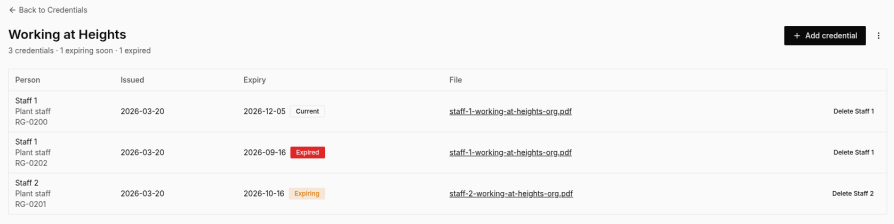
- Status. Syraxis works this out from the expiry date: current, expiring within 30 days, or expired. A certificate with no expiry date stays current. There is no approval step and no review queue.
- Identification. An ID number, ID dates, and a photo or PDF stay on the person. They are not a credential type.
Your own people
Credentials is for the people who work for you. The page opens on the types, with a count of how many certificates are held, how many run out within 30 days, and how many have already expired. Open a type to see who holds it, the dates, the status, and the file.
A person linked to a login can see and update their own certificates under My credentials, in Account settings.
Contractor people
A contractor company keeps the same kind of certificates on its own team, from the contractor portal. The key contacts (up to five) are the people who sign in. The team is the wider list of people whose certificates you are tracking.
- Your own staff can see that team and mark whether someone is working, on standby, onboarding, or on leave. They do not add or change that person's certificates.
- On a safety file, the people are listed above the company documents, with each person's role, how many certificates they hold, and when the next one runs out.
- You add the certificate on the person, not on the file. Taking someone off the file does not delete the person or their certificates.
- The earliest expiry across the people on the file is separate from the date on the company documents.
Computer only. Your own staff use Credentials in the main menu. A contractor company looks after its team from the portal. My credentials stays in Account settings.
Start with templates, inspections, and actions.
Free to start. No card needed. 14-day Pro trial when you create an organisation.